


Primary School · Years 1 to 6 · 2026

Welcome to

The first day is Tuesday 27 January 2026. Doors open at 8.15am for an 8.30am roll call.

Welcome

Welcome to Primary at JPC

We want every child and family to have the best setting in which to achieve and flourish as independent, confident and resilient learners. As a fully authorised International Baccalaureate (IB) World School, learning happens through rich, purposeful, structured inquiry in a safe, happy and supportive environment.

Below you’ll find information about starting Primary School at JPC. More detail is in our College Handbooks, and we’ve answered common questions in the FAQs.

Tuesday 27 January 2026

First day of school

All students, including new students, go directly to their classrooms.

Primary first day times
TimeWhat happens
8.00amStaff in The ARC to help students who don’t know their classroom
8.15amClassroom doors open
8.30amRoll call (marked electronically)

The Primary Office will email you on 28 November with your child’s classroom teacher.

Primary students and teacher with a globe in the classroom
Before Day One

Primary checklist

Requirements change from year level to year level, so please check what’s needed for your child. Select each step as you finish it – your progress is saved on this device.

0 of 7 done
  1. Book a uniform fitting

    Book a 30-minute uniform fitting for your child. Walk-ins can’t be accepted during this time, and a separate session is needed for each child.

  2. Stationery and headsets

    All student stationery is supplied from Prep to Year 6, with these exceptions:

    • Prep to Year 3: the burgundy JPC Home Reader case from the Retail Centre (kept from Prep onwards).
    • Years 1 to 6: an empty pencil case of their own.
    • 2026 Year 1 students (moving to 1:1 iPads) and new students in Years 2 to 6: Shintaro SH-131 Rugged Kids Headset (USB-C) from the Retail Centre.
    • Continuing Years 2 to 5: headsets come home at the end of the year – please send them back for 2026. Replace them from the Retail Centre only if they are worn out or not working.
  3. Instrumental or vocal tuition

    Students can enrol in instrumental or vocal lessons at any time during the year by completing a Performing Arts Enrolment Form:

    Ensemble options are listed in the Performing Arts Handbook.

  4. Sport and activities registration

    An email with the Primary Sport and Activity Overview for Term 1 will be sent to families in early 2026, with schedules and registration details.

  5. Learn to Swim

    To sign up for the Learn to Swim program, please contact Absolute Aquatics.

  6. Outside School Hours Care (OSHC)

    To enrol in OSHC or Vacation Care, complete the online enrolment form through MyXplor. Bookings must be made online through MyXplor. For help, email oshc@jpc.qld.edu.au.

    Vacation Care is closed from Monday 22 December to Friday 9 January.

  7. Read the College Handbook

    We encourage all parents to read the College Handbook so you are familiar with important guidelines and requirements.

Retail Centre Holiday Hours

Uniform fitting

The John Paul College Retail Centre offers 30-minute uniform fitting sessions during the Christmas break for all new and current students. Walk-ins can’t be accepted during this time.

  • Book a separate session for each child – we recommend making the bookings back to back.
  • The Athlete’s Foot pop-up is on campus Monday 5 – Friday 23 January (weekdays). No booking needed; purchases available on the day.
  • Questions? Call 07 3826 3397 or email retailcentre@jpc.qld.edu.au.
Primary student in uniform with a drone in a green outdoor setting
Getting to School

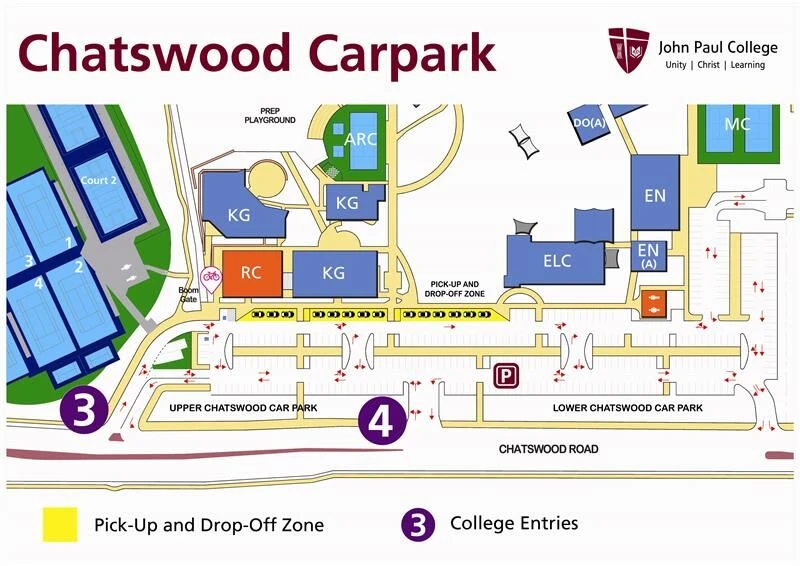
Chatswood Car Park drop-off and pick-up

Procedures for parents and carers of Primary School students.

  • The Chatswood Car Park has an upper and a lower section.
  • There are 14 drop-off and pick-up bays in front of the Retail Centre and Kindergarten. Enter through Entry 3 in the upper Chatswood Car Park.
  • Two marquees along the drop-off and pick-up fence provide all-weather shelter during afternoon pick-up, and staff supervise students.
  • At pick-up, cars in the bays for more than five minutes will be asked to loop back and rejoin the end of the line – keeping traffic moving is the priority.
  • For parent parking, enter through Entry 3 and turn right immediately (avoiding the drop-off area), or use Entry 4.
  • The Mayflower Car Park (Entry 5) no longer has a drop-off and pick-up area, and the Mayflower Street entry is now both an entry and an exit. Please don’t queue there.
  • Secondary student leaders (“Car Park Superheroes”) help students get to class or The ARC in the mornings.
Morning routine
  • Years 1 and 2: use the drop-off and pick-up bays. Students arriving between 8.00am and 8.15am are supervised in The ARC, then go to classrooms at 8.15am.
  • Years 3 to 6: use the drop-off and pick-up bays. Students arriving before 8.15am wait respectfully outside their classrooms – playgrounds and courts are out of bounds before 8.15am.
Afternoon routine
  • Years 1 and 2: teachers help students to cars in the bays from 3.00pm to 3.30pm. Students still waiting after 3.30pm are signed into OSHC.
  • Years 3 to 6: students are released at 3.15pm. Anyone not collected by 3.30pm is signed into OSHC.
Tips for the Chatswood Car Park
  • Arrive before 8.20am to avoid congestion.
  • Collecting more than one child? Arrive when your eldest is dismissed at 3.15pm.
  • Use OSHC for early drop-offs or late pick-ups to ease pressure on the car park.
Map of Chatswood Car Park showing Entries 3 and 4 and the drop-off and pick-up zone in front of the Retail Centre and Kindergarten
Select the map to open it full size.
New for 2026 · Years 5 to 8

A Team Tuition program

From Term 1, students in Years 5 to 8 can access on-campus tutoring delivered by A Team Tuition, one of Australia’s leading providers of academic coaching. The program supports students’ engagement, confidence and achievement in years where learning routines, motivation and foundational skills have a big impact on long-term success.

New for 2026 · Years 5 to 8

A Team Tuition

Cost
From $397.00 per term, paid directly to A Team Tuition
Duration
One 90-minute session per week for 8 weeks
Times
Tuesdays and Thursdays, 3.30pm – 5.00pm
Term weeks
Weeks 2 to 9
Location
On-campus classrooms (Wesley Building)

Register for A Team Tuition
Term Dates 2026

Plan ahead

2026 term dates
TermDates
Term 1Tuesday 27 January – Thursday 2 April
Term 2Tuesday 21 April – Friday 19 June
Term 3Tuesday 14 July – Friday 18 September
Term 4Tuesday 6 October – Friday 27 November
See all term dates and public holidays
Primary student in front of a rocket launch with the words Ignite Ambition
Starting Primary at JPC

Frequently asked questions

Where can I find a map of the College?

To help families find their way around, the College has maps showing all buildings and areas of interest: the College Map and the Primary Precinct Map.

Where do I drop off and pick up my child?

Parents and guardians of Primary School students are asked to use the Chatswood Car Park each day. It has been designed with student safety in mind and to keep traffic flowing. You must park in an allocated space to drop off or pick up a student – stopping to let children out of or into a vehicle puts them in danger and is not permitted.

The Chatswood and Markwell Car Parks are very busy in the first weeks of each term – thank you for your patience and for following road safety rules. See the car park procedures above.

What co-curricular activities are on offer?

As part of our holistic approach to education, John Paul College offers a wide range of co-curricular activities. All students are required to take part in at least one co-curricular activity each year.

Sport and activities

Registration information for all sports and activities is shared before the start of each term. We place a strong emphasis on participation, but some sports may hold trials where places are limited. To keep the process consistent and fair for new and existing students, this information is sent to all parents before each term and posted in MyJPC. For further information, email sport@jpc.qld.edu.au and we will direct your question to the right staff member.

Performing Arts

New students who would like to join performing arts ensembles and groups can request an audition. To learn more about the Performing Arts Program, call the Performing Arts office on 07 3826 3383 to speak with a program coordinator.

For private or group music lessons, please complete a Performing Arts Enrolment Form – new students or current JPC students. Ensemble options are listed in the Performing Arts Handbook.

Can my child use Vacation Care or Outside School Hours Care?

Some new Primary families may lose access to their current care provider once they withdraw. Families of new students from Kindergarten upwards are welcome to use the College Vacation Care Program – it’s a great way for your child to meet new friends and get to know the campus before their first official day.

To use Vacation Care during the current holidays, complete the online enrolment form through MyXplor. Bookings must be made online through MyXplor. For help, email oshc@jpc.qld.edu.au.

What is MyJPC and how do I log in?

MyJPC is the College’s all-in-one information platform for parents, students and staff. It gives you instant access to College updates, notices, newsletters, calendars and key resources in one place.

You will receive an email with your username and password about two weeks before your child starts at the College. Please make sure the College has a current email address for you, as accounts can’t be created without one, and check your junk folder in case the email is filtered as spam.

If you haven’t received your login details by the day before New Family Orientation, please contact Techsphere (itadmin@jpc.qld.edu.au).

The MyJPC Platform Guide will help you find your way around MyJPC (sign in to MyJPC to open it). User sessions for new parents are offered as part of the Orientation Program.

How does the Cashless Canteen work?

Your family ID number is your username for the Cashless Canteen. You will be given a temporary password, which you’ll need to change after your first login. To access the Cashless Canteen, log in to the MyJPC dashboard and select “Canteen Online Orders”.

If you need help setting up or accessing the Cashless Canteen through My Student Account (MSA), please contact our Finance team.

Tuckshop for Prep to Year 3 students must be ordered online through My Student Account (MSA). Students in Years 4 to 12 can visit the tuckshop directly. We recommend new students bring their own lunch for the first few days.

Is there a bus service?

For the safety of our students, John Paul College offers a number of private bus routes around the community for students in Years 4 to 12. Families of younger students who would like to use the service need to contact the Head of School so the College can make sure these students are completely safe.

To keep costs down for families, the buses are not a door-to-door service. Routes are set by the College based on feedback from our Bus Route Expression of Interest forms. While we can’t guarantee a route in your area, we use this feedback to improve our routes each year.

Fares are paid with a Translink card, subsidised by the College, and buses use council bus stops for pick-ups and drop-offs. Students only pay for what they use and no booking is needed. See the full list on our Bus Routes page.

How do I report an absence?

If your child can’t attend, please let us know on the day of the absence or partial absence by any of these methods:

  • The “Report Absences” button under QUICK LINKS in MyJPC
  • The Absentee Line on 07 3826 3566 from 7.30am (a message service is available before this time)
  • The Primary Office from 8.15am
  • Email absences@jpc.qld.edu.au

For leave of four days or more, please submit a Leave of Absence Form in MyJPC under FAMILY MANAGEMENT. It will be sent to the Deputy Principal – Head of Primary. See the Attendance Policy for more detail.

Students who arrive late should sign in at the Primary Office on their way to class. The roll is marked electronically at 8.30am, and later arrivals are recorded by the Primary Office.

When will I find out my child’s class?

The Primary Office will email you on 28 November with your child’s classroom teacher. For Prep students, this email also includes your child’s staggered start date.

We’re Here To Help

Need help or have questions?

We’re here to support you every step of the way.

See you in the classroom

Work through the checklist before Tuesday 27 January, and contact us if you have any questions.